If you’ve used the new CF8 UI features to create tabs, you may have run into an issue when you have a lot of them. By default the tabs will not wrap. Take this snippet of code for example. I’ve added a red border on this 300 pixel div so you can see the tabs won’t wrap inside of it:
<div style="font-family: arial; width: 300px; border: 1px solid red;">
<cflayout type="tab" name="myTabs">
  <cflayoutarea name="january" title="January 2009">
     <p>January</p>
  </cflayoutarea>
  <cflayoutarea name="february" title="February 2009">
     <p>February</p>
  </cflayoutarea>
  <cflayoutarea name="march" title="March 2009">
     <p>March</p>
  </cflayoutarea>
  <cflayoutarea name="april" title="April 2009">
     <p>April</p>
  </cflayoutarea>
</cflayout>
</div>
Imagine that 300 pixel div is your normal content area – it could be a table or just the width of your browser. Take a look at what it produces in your browser:
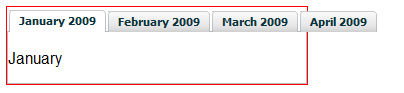
In ColdFusion 8 (this might change in CF9?) the tabs generated by cflayout are table data cells. It would be pretty hard to cause table data cells to wrap within a set of <tr></tr> tags wouldn’t you think? It actually is possible though. If you add this snippet of CSS:
<style type="text/css">

.x-tabs-strip tr {display:block}

.x-tabs-strip td {display:block; float:left}

.x-tabs-strip .on .x-tabs-inner {padding-bottom:4px}

</style>
You’ll see the tabs now look like this:
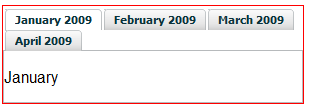
If you want to force the tabs to be a specific width, add one more line:
<style type="text/css">

.x-tabs-strip tr {display:block}

.x-tabs-strip td {display:block; float:left}

.x-tabs-strip .on .x-tabs-inner {padding-bottom:4px}

.x-tabs-wrap table {width:400px}

</style>
In most JavaScript frameworks tabs are done using list elements (<li> tags) inside an unordered list (<ul> tag). This approach is much more flexible. It will be interesting to see what changes are made to the html generated by the layout tags in ColdFusion9.
Update 1/4/2010 – The method described above does NOT work in CF9. The tabs generated in CF9 are done using a much newer version of EXT. They are no longer based on table data cells, instead they use list items ( <li> tags), like most tab implementations. Use this CSS to wrap the tabs in CF9.


Deborah says:
this only worked for me in Firefox. It does not wrap in IE.
14 October 2009, 7:27 amRyan says:
It works in IE8, but not 6 or 7. I don't think its possible to make the CF8 (and 9?) tabs wrap in IE 6 or 7.
14 October 2009, 8:00 amsetare says:
It worked for me in Firefox but not in IE,can you help me?
14 April 2010, 5:50 amRyan says:
setare, what version if IE is it not working in?
It will only work in IE8. I don't think its possible to make CF8 tabs wrap in IE6 7.
14 April 2010, 7:09 amsetare says:
thanks Ryan,i checked it with IE8 But does not work:(
30 April 2010, 10:41 pmRyan says:
setare you are right, its not working in IE8. I'm not sure if I had some additional CSS in there when it was working in IE8 for me, or if I was just mistaken.
We've since upgraded to CF9 and this is no longer an issue for us, so I really haven't put any more time into it. You could use an alternate tab library (like jQuery UI or Spry) or try the EXT forums, since that is what ColdFusion is using under the hood to make the tabs.
1 May 2010, 6:50 pmsetare says:
Thank you for your answer,Best wishes to you..
2 May 2010, 2:32 amcollege essays says:
It worked in Firefox, but not in Opera, have you any ideas? thnks
13 May 2010, 7:04 am