I often need to write ad-hoc reports in MS SQL Studio, and then provide those results in an Excel spreadsheet. This has usually been a little tedious, I copy & paste the results from SQL Studio into Excel, then have to manually add column names to the Excel spreadsheet. So I finally spent some time figuring out how to do this better, and discovered that it is possible to have the column names come over automatically. I’m sure many of you already knew about this, but I didn’t so I thought it might be worth sharing. I had tried googling this in the past and didn’t come up with anything, so maybe it’s not widely known.
Continue reading ‘Copying data from SQL Studio to Excel’ »
Archive for the ‘SQL’ Category
I love the CFSPREADSHEET tag that was added to ColdFusion9. It makes working with spread sheet data so easy. The spreadsheets I am given to work with often contain descriptive column names that contain spaces like “First Name” or “Home Phone”. This causes a problem when you try to work with the data in a QoQ (query of a query).
Lets say you have a spread sheet containing these columns: Name, City, State, Postal Code. Then pull it into a query using the cfspreadsheet tag:
<cfspreadsheet action="read" src="c:\Customers.xls" query="customers" headerrow="1" rows="2-65536" sheetname="Customers">
Now try to narrow down the results to only those in a certain postal code. This won’t work of course:
<cfquery name="qryCA" dbtype="query">

SELECT * FROM customers WHERE [Postal Code] = '90210'

</cfquery>
Neither will this:
<cfquery name="qryCA" dbtype="query">

SELECT * FROM customers WHERE [Postal\ Code] = '90210'

</cfquery>
Or this:
<cfquery name="qryCA" dbtype="query">

SELECT * FROM customers WHERE ['Postal Code'] = '90210'

</cfquery>
I have not found any way to escape a space in a column name inside QoQ. But, thankfully there is a way we can manipulate the column names to remove the space.
<cfset colNameArray = customers.getColumnNames() />
<cfloop from="1" to="#arrayLen(colNameArray)#" index="i">
	<cfset colNameArray[i] = colNameArray[i].replace(' ','') />
</cfloop>
<cfset customers.setColumnNames(colNameArray) />
You could use this to completely rename column names if you wanted to. This isn’t just useful for working with cfspreadsheet either, I could see this being used in other circumstances to change the column names.
Thanks to Steven Neiland for pointing me in this direction.
Lately I’ve come across some online formatting tools that have been very helpful. I like these because they work regardless of what IDE you use, what operating system, etc. They work from any computer that has internet access. Handy when you are troubleshooting on a remote machine.
Here is one for formatting XML: http://www.shell-tools.net/index.php?op=xml_format
And one for JSON from the same site: http://www.shell-tools.net/index.php?op=json_format
Here is a SQL one that helped me out a lot tonight: http://www.dpriver.com/pp/sqlformat.htm
I fed it a horrible looking, very complex query and it made it easily readable. 🙂
I came across an interesting problem the other day where I needed to join to either one of two different tables. Here is an example scenario:
Say you have an ecommerce site that your customers log into. Customers exist in a table named “customers”. When they place an order, an order record is created in the orders table. There is a CreatorID field that indicates which customer placed the order. A common practice when creating order reports is to join the order to the customer in order to be able to display the customer contact information when displaying the order.
SELECT orders.*, customers.name FROM orders

JOIN customers on orders.creator ID = customers.customerID
Later you are given the task of allowing vendors to place orders. Vendors also log into your site but their accounts are stored in a separate vendors table. So now you are faced with the question of how to link orders to both the customers and vendors table. You could add a vendorID field to the orders table, then change your join to connect to both tables:
SELECT orders.*, customers.name AS customerName, vendors.name AS vendorName FROM orders

LEFT JOIN customers on orders.creator ID = customers.customerID

LEFT JOIN  vendors on orders.vendorID = vendors.vendor ID
The LEFT JOIN here is necessary so we still get an order record even when there is not a match in the customers or vendors table. The problem I had with this approach is it requires changing a lot of other code on the system. Because the “name” column is ambiguous between the two tables, we had to alias the “name” column to be different for each of the two tables. So now all your view code would have to be changed to look at one of those two columns.
<cfoutput query=”TodaysOrders”>

 	order: #orderID#, placed by

	<cfif val(creatorID)>#customerName#<cfelse>#vendorName#</cfif>

</cfoutput>
Here is another solution – I added creatorIDtype field that indicates if the creatorID is a customer or a vendor:
SELECT orders.*,

name =

CASE e.creatorIDtype

		WHEN 'CUSTOMER' THEN customer.name

	      	ELSE vendor.name

	    	END

FROM orders

LEFT JOIN customers on orders.creatorID = customers.customerID

LEFT JOIN  vendors on orders.creatorID = vendors.vendorID
Now the view code does not need to be changed, the “name” column will continue to hold the name of the person who placed the order, regardless if it was a customer or a vendor.
Here’s a neat trick when you need to concatenate child rows in a SQL Select statement. What do I mean by that? Its a little hard to explain, so I’ll try to illustrate below.
Say you have these two database tables:
| OrderID | OrderNotes |
| 1 | Notes about order 1 |
| 2 | Notes about order 2 |
| 3 | Notes about order 3 |
| LineItemID | OrderID | LineNotes |
| 50 | 1 | ABC |
| 51 | 1 | XYZ |
| 52 | 2 | HJK |
| 53 | 2 | DEF |
| 54 | 2 | KLM |
Using the SQL trick below you will end up with a result set that looks like this:
| OrderID | OrderNotes | listOfLineNotes |
| 1 | Notes about order 1 | ABC,XYZ |
| 2 | Notes about order 2 | HJK,DEF,KLM |
| 3 | Notes about order 3 | NULL |
When would you need to do this? I’ve need it a couple times. One was when we were grabbing database records to index into Verity. We wanted not only data from the orders table, but also wanted to index all the notes on each line item, which were separate records in a different table. We didn’t want to index these separately, because if there was a match in a Verity search we wanted to return the order, not the line item. Using the query below we were able to combine all this data into one query.
SELECT *
FROM orders AS o
CROSS APPLY (
	SELECT linenotes + ','
	FROM orderLines AS ol
	WHERE ol.orderID = o.orderID
	FOR XML PATH('') )
temp ( listOfLineNotes )
Using this code, listOfLineNotes will be a comma separated list of all the line item notes for this order.
Another time this trick came in handy was when we needed to get some records from a literature database table to display on our public website. We were going to do some filtering using JavaScript, so needed a field in each literature item row that contained a list of all the categories the item was in. This was an easy way to accomplish that.
I had an issue recently when I was working with a couple other developers on a project. We keep our MySQL database in sync by exporting the database as an SQL script and sharing it in a subversion repository (I wish MS SQL could be this easy!). Our table names are saved with mix case, like “userFiles”, but everytime I would export my database the tables would come out all lower case, like “userfiles”.
Turns out this is a simple thing to fix, I had to add a line to MySQL’s config file: my.cnf. Mine was located at [MySQL installed root]\bin\my.cnf. The setting that needs to change is lower_case_table_names, I set the value to 2, like this:
lower_case_table_names=2
If you are interested, here are the different possible values:
| Value | Meaning |
| 0 | Table and database names are stored on disk using the lettercase specified in the CREATE TABLE or CREATE DATABASE statement. Name comparisons are case sensitive. Note that if you force this variable to 0 with –lower-case-table-names=0 on a case-insensitive file system and access MyISAM tablenames using different lettercases, index corruption may result. |
| 1 | Table names are stored in lowercase on disk and name comparisons are not case sensitive. MySQL converts all table names to lowercase on storage and lookup. This behavior also applies to database names and table aliases. |
| 2 | Table and database names are stored on disk using the lettercase specified in the CREATE TABLE or CREATE DATABASE statement, but MySQL converts them to lowercase on lookup. Name comparisons are not case sensitive. This works only on file systems that are not case sensitive! InnoDB table names are stored in lowercase, as for lower_case_table_names=1. |
On Windows the default is 1.
More information at http://dev.mysql.com/doc/refman/5.0/en/identifier-case-sensitivity.html
The other day I had a need to be creating dates in a SQL Server SQL statement, made from a few different text fields. I could not find a function to create a date from these, so I wrote one (with the help of our in house SQL guru).
Continue reading ‘A ‘MakeDate’ function for MS SQL Server’ »
There may be something buggy here, or maybe I’m misunderstanding how this should work.
This code executes fine:
<cfquery name="qryListings" dbtype="query">
SELECT 1 as OrdBy, * FROM qryListings
UNION
SELECT 2 as OrdBy, * FROM qryListingsTmp
ORDER BY OrdBy
</cfquery>
But when I add a WHERE clause to the second part to filter out records that were in the first group:
<cfquery name="qryListings" dbtype="query">
SELECT 1 as OrdBy, * FROM qryListings
UNION
SELECT 2 as OrdBy, * FROM qryListingsTmp WHERE ref_num NOT IN
(#ValueList(qryListings.ref_num)#)
ORDER BY OrdBy
</cfquery>
I get a ColdFusion error about the number of columns being different between the two queries.
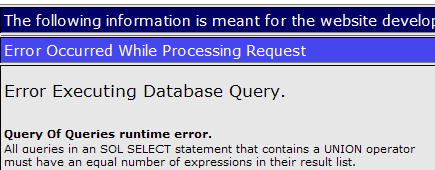
I ran into this issue when adding a new datetime column to an existing table in my MySQL 5 database. I did not get the error in my production environment, only the dev environment on my local machine.

I was puzzled by this error, because I thought the all zeros value basically meant a null/unknown date value. Also I wasn’t using a type TIMESTAMP, I was using a DATETIME column type, so that threw me, too. After digging through the data a little bit, I found that the values for these new columns in the production database were NULL, but the values in my dev database were ‘0000-00-00 00:00:00’. A little googling told me that the all zeros value is what happens when an invalid date is assigned to a datetime field.
I could not see any differences in the schema, so I’m not sure how this happened. But updating my dev data to be NULL where the value was ‘0000-00-00 00:00:00’ solved the problem.
The other option, if you can’t change your data, is to add these items to your connection string value in the ColdFusion Administrator for your datasource:
noDatetimeStringSync=true&zeroDateTimeBehavior=convertToNull
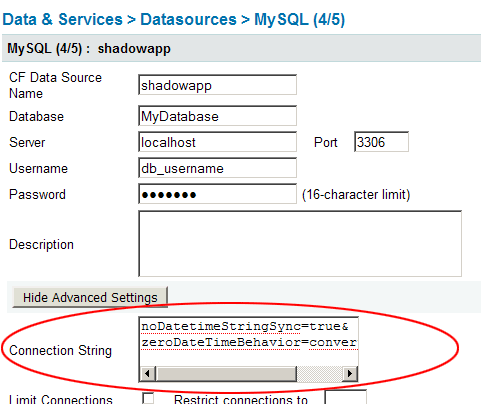
This tells MySQL to return a null instead of throwing an exception when one of these values is found. This is how I initially solved the problem, until I figured out that ‘0000-00-00 00:00:00’ was not a proper value.
I’ve never found a great solution for pagination in SQL 2000. I much prefer MySQL’s syntax: SELECT * FROM table LIMIT 100,10. That will get you 10 records starting at the 100th record. Why MS SQL still doesn’t offer an opposite to TOP, I don’t know. Yes, I’ve seen the double TOP method where you sort your data twice to end up with the last X rows. It works, but its not exactly elegant.
But I have come across a new method for pagination using some new 2005 features that is pretty neat. What I really like about this solution is that it gives you a count of the total number of records, which you usually don’t get with other pagination methods.
Continue reading ‘Elegant pagination with MS SQL 2005’ »