A while back I wrote a post about accessing form fields in ColdFusion as an array. This is useful when you have several fields with the same name, and there is a chance they could contain a comma. Working with the data as an array is much more robust.
But after updating to CF10 I realized this didn’t work anymore! I was surprised, since I thought the getPageContext() stuff was pretty standard, and not undocumented. So anyway I’ve rewritten my function to work in CF10. The code is much simpler now.
<cffunction name="formFieldAsArray" returntype="array" output="false" hint="Returns a Form/URL variable as an array.">
	<cfargument name="fieldName" required="true" type="string" hint="Name of the Form or URL field" />

	<cfset var content = getHTTPRequestData().content />
	<cfset var returnArray = arrayNew(1) />

	<cfloop list="#content#" delimiters="&" index="local.parameter">
		<cfif listFirst(local.parameter,"=") EQ arguments.fieldName>
			<cfif ListLen(local.parameter,"=") EQ 2>
				<cfset arrayAppend(returnArray,URLDecode(listLast(local.parameter,"="))) />
			<cfelse>
				<cfset arrayAppend(returnArray,"") />
			</cfif>
		</cfif>
	</cfloop>

	<cfreturn returnArray />

</cffunction>
You may have heard about the new sameformfieldsasarray setting in CF10. This is another option. But it is application-wide. That is, anytime you have form fields with the same name they will come through as an array. This may or may not work for you. In my application, enabling that would break a lot of code so I wrote this separate function to handle when I need the values as an array.
Posted by Ryan Stille on February 19 2013 at 6:20 pm under ColdFusion.
Comments Off on Accessing form fields as an array in CF10.
The other day I discovered that the img tag has an error event. This can be used to automatically load a fall back image when the main image fails for some reason. We encounter this in our dev sites sometimes, because the data is often not 100% correct. For example, our application may ‘think’ there is an image for a product (according to the database), so it writes out an img tag for it. But the image file does not actually exist. So we may end up with a broken image icon, or depending on the browser there may be no indication at all that something is wrong. The tester may get confused as to what’s gone wrong. So I added this code to show an ‘image file does not exist’ image:
<img src="#productImage#" onerror="this.src='/images/icons/imageDoesNotExist.png'" >
That’s it. Be careful that in your error handling code you point to an image file that really exists, otherwise you could go into an infinite loop. One way to be safe regarding that would be to call a function, and remove the onerror attribute so that it only gets fired once.
<script>
function imageError(element) {
	element.onerror='';
	element.src='/images/icons/imageDoesNotExist.png';
	}
</script>

<img src="#productImage#" onerror="imageError(this)">
You could even use this to report a broken image:
<img src="#productImage#" onerror="this.src='logBrokenImage.cfm?image=' + this.src" >
The onerror event is supported in all major browsers. The other tags that support onerror are object, script, and style.
Posted by Ryan Stille on January 8 2013 at 10:05 am under AJAX / JavaScript, CSS.
5 Comments.
I often need to write ad-hoc reports in MS SQL Studio, and then provide those results in an Excel spreadsheet. This has usually been a little tedious, I copy & paste the results from SQL Studio into Excel, then have to manually add column names to the Excel spreadsheet. So I finally spent some time figuring out how to do this better, and discovered that it is possible to have the column names come over automatically. I’m sure many of you already knew about this, but I didn’t so I thought it might be worth sharing. I had tried googling this in the past and didn’t come up with anything, so maybe it’s not widely known.
Continue reading ‘Copying data from SQL Studio to Excel’ »
Posted by Ryan Stille on January 2 2013 at 9:14 am under SQL.
3 Comments.
I ran into an interesting issue today. Our database timestamps are all stored in UTC. So when a user runs a report from a webpage, we convert the time they entered into a UTC timestamp. If we didn’t do this, the report may miss some records.
For example, a customer buys a product at 11:00pm our time on the 1st of the month. The timestamp in the database for this record will be 5:00am on the 2nd, since we are -6 hours from UTC here in the Central timezone.
So we modify timestamps in our reporting queries like this:
...  WHERE
order.createDate > <cfqueryparam value="#DateConvert('local2utc', arguments.startDate)#" cfsqltype="cf_sql_timestamp">
AND
order.createDate < </cfqueryparam><cfqueryparam value="#DateConvert('local2utc', arguments.endDate)#" cfsqltype="cf_sql_timestamp"></cfqueryparam>
There is an issue with this in CF10. Take this code:
<cfset arguments.startDate = CreateDateTime(2012,1,1,00,00,00)></cfset>
<cfquery>
...
WHERE order.createDate > <cfqueryparam value="#DateConvert('local2utc', arguments.startDate)#" cfsqltype="cf_sql_timestamp">
....
</cfqueryparam></cfquery>
<cflog text="I think I passed #DateConvert('local2utc', arguments.startDate)# to the database"></cflog>
If you look in your log you’ll see I think I passed {ts '2012-01-02 6:00:00'} to the database (since I am -6 from UTC). But if you look in the debugging information for this query, or use SQL Server Profiler to view it, you’ll see it gets sent to the database as 2012-01-01 00:00:00:000!
Continue reading ‘Using DateConvert to get a UTC timestamp may not return what you expect’ »
Posted by Ryan Stille on December 13 2012 at 12:57 pm under ColdFusion.
Comments Off on Using DateConvert to get a UTC timestamp may not return what you expect.
When accepting uploads from a browser, it can sometimes be handy to have access to the filename before using CFFILE to “upload” the file onto the file system. For example say you want to show an error message if the file is not a PDF. In that case what I’ve usually done is use CFFILE to place the file onto the file system, and then check the extension. If its not in my allowed list, then I delete the file and send an error message to the client. But using the code below I can check the file extension without having to use CFFILE first. For example you could do something like this:
<cfset theClientFilename = getClientFileName("myFormField")>
<cfif ListLast(theClientFilename,".") NEQ "pdf">
   // do your error handling here
<cfelse>
  // else the extension is ok. Use cffile to handle the upload and proceed
</cfelse></cfif>
</cfset>
Here is the getClientFileName function, both in cfscript and regular tag formats.
Continue reading ‘Getting the client filename before using cffile’ »
Posted by Ryan Stille on December 4 2012 at 12:41 am under ColdFusion, Railo.
3 Comments.
I thought this was some interesting JavaScript that I used recently to detect if form fields were filled in. This was a case where if any of a particular group of fields were filled in, I needed to validate and make sure they were all passed in.
var allValues = $("input.someClass").map(function() { return this.value; }).get().join('');

if (allValues.length) {
  // do validation here to make sure all fields are filled in
  }
Posted by Ryan Stille on October 27 2012 at 3:40 pm under AJAX / JavaScript.
2 Comments.
When I migrated our Mura site to our new IIS7 servers, one problem I noticed is that the Mura 404 handler was no longer showing. Instead the default IIS 404 page was displaying.
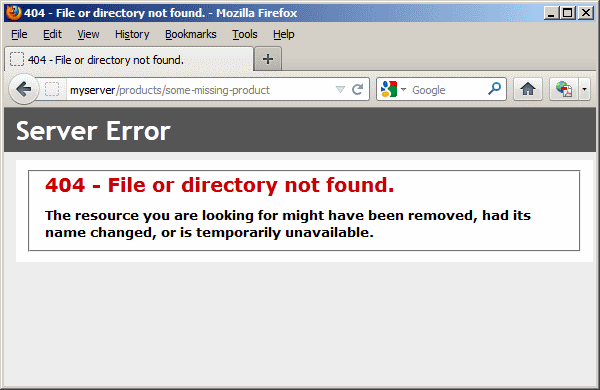
This problem doesn’t only apply to Mura, it will crop up with framework or code that uses the onMissingTemplate handler. The fix is easy. Edit the web.config file in the webroot, look for an httpErrors tag. It might look like this:
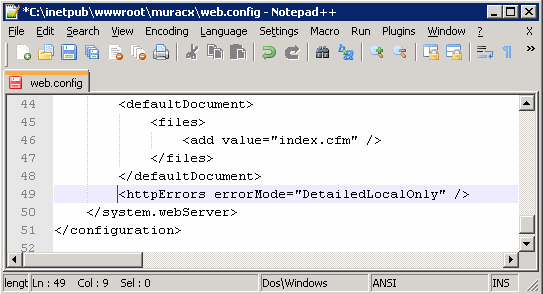
You need to add existingResponse="PassThrough" to it. If that element is missing completely, just add it with the necessary attribute.
Fixed!
Posted by Ryan Stille on June 11 2012 at 10:00 am under System Administration, Uncategorized, Web Development.
Comments Off on Mura 404 page not working in IIS7 – fix it in web.config.
Wanting to try out the new ColdFusion 10 beta without downloading and installing it? Hostek is offering free CF 10 beta hosting. You’ll get 5GB of storage space, and 200GB of transfer. Plenty of resources to play around with. You’ll get your own subdomain to use, and access to a MySQL database.
Get it here: http://hostek.com/hosting/coldfusion/coldfusion10-hosting.asp
Posted by Ryan Stille on March 4 2012 at 9:47 pm under ColdFusion.
1 Comment.
I love the CFSPREADSHEET tag that was added to ColdFusion9. It makes working with spread sheet data so easy. The spreadsheets I am given to work with often contain descriptive column names that contain spaces like “First Name” or “Home Phone”. This causes a problem when you try to work with the data in a QoQ (query of a query).
Lets say you have a spread sheet containing these columns: Name, City, State, Postal Code. Then pull it into a query using the cfspreadsheet tag:
<cfspreadsheet action="read" src="c:\Customers.xls" query="customers" headerrow="1" rows="2-65536" sheetname="Customers">
Now try to narrow down the results to only those in a certain postal code. This won’t work of course:
<cfquery name="qryCA" dbtype="query">

SELECT * FROM customers WHERE [Postal Code] = '90210'

</cfquery>
Neither will this:
<cfquery name="qryCA" dbtype="query">

SELECT * FROM customers WHERE [Postal\ Code] = '90210'

</cfquery>
Or this:
<cfquery name="qryCA" dbtype="query">

SELECT * FROM customers WHERE ['Postal Code'] = '90210'

</cfquery>
I have not found any way to escape a space in a column name inside QoQ. But, thankfully there is a way we can manipulate the column names to remove the space.
<cfset colNameArray = customers.getColumnNames() />
<cfloop from="1" to="#arrayLen(colNameArray)#" index="i">
	<cfset colNameArray[i] = colNameArray[i].replace(' ','') />
</cfloop>
<cfset customers.setColumnNames(colNameArray) />
You could use this to completely rename column names if you wanted to. This isn’t just useful for working with cfspreadsheet either, I could see this being used in other circumstances to change the column names.
Thanks to Steven Neiland for pointing me in this direction.
Posted by Ryan Stille on October 16 2011 at 8:33 pm under ColdFusion, SQL.
3 Comments.
Lately I’ve come across some online formatting tools that have been very helpful. I like these because they work regardless of what IDE you use, what operating system, etc. They work from any computer that has internet access. Handy when you are troubleshooting on a remote machine.
Here is one for formatting XML: http://www.shell-tools.net/index.php?op=xml_format
And one for JSON from the same site: http://www.shell-tools.net/index.php?op=json_format
Here is a SQL one that helped me out a lot tonight: http://www.dpriver.com/pp/sqlformat.htm
I fed it a horrible looking, very complex query and it made it easily readable. 🙂
Posted by Ryan Stille on July 13 2011 at 7:53 pm under AJAX / JavaScript, Misc, SQL.
1 Comment.