I came across an interesting problem the other day where I needed to join to either one of two different tables. Here is an example scenario:
Say you have an ecommerce site that your customers log into. Customers exist in a table named “customers”. When they place an order, an order record is created in the orders table. There is a CreatorID field that indicates which customer placed the order. A common practice when creating order reports is to join the order to the customer in order to be able to display the customer contact information when displaying the order.
SELECT orders.*, customers.name FROM orders

JOIN customers on orders.creator ID = customers.customerID
Later you are given the task of allowing vendors to place orders. Vendors also log into your site but their accounts are stored in a separate vendors table. So now you are faced with the question of how to link orders to both the customers and vendors table. You could add a vendorID field to the orders table, then change your join to connect to both tables:
SELECT orders.*, customers.name AS customerName, vendors.name AS vendorName FROM orders

LEFT JOIN customers on orders.creator ID = customers.customerID

LEFT JOIN  vendors on orders.vendorID = vendors.vendor ID
The LEFT JOIN here is necessary so we still get an order record even when there is not a match in the customers or vendors table. The problem I had with this approach is it requires changing a lot of other code on the system. Because the “name” column is ambiguous between the two tables, we had to alias the “name” column to be different for each of the two tables. So now all your view code would have to be changed to look at one of those two columns.
<cfoutput query=”TodaysOrders”>

 	order: #orderID#, placed by

	<cfif val(creatorID)>#customerName#<cfelse>#vendorName#</cfif>

</cfoutput>
Here is another solution – I added creatorIDtype field that indicates if the creatorID is a customer or a vendor:
SELECT orders.*,

name =

CASE e.creatorIDtype

		WHEN 'CUSTOMER' THEN customer.name

	      	ELSE vendor.name

	    	END

FROM orders

LEFT JOIN customers on orders.creatorID = customers.customerID

LEFT JOIN  vendors on orders.creatorID = vendors.vendorID
Now the view code does not need to be changed, the “name” column will continue to hold the name of the person who placed the order, regardless if it was a customer or a vendor.
Posted by Ryan Stille on May 22 2011 at 7:40 pm under SQL.
6 Comments.
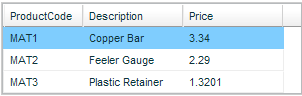
A while back I had the need to do some formatting on a cfgrid. I was using a typical product/price table but the prices are stored with 4 decimals and we needed to display that much resolution. The html version of CFGRID does not directly support this.
Consider this “fake” query set:
<cfset materials=QueryNew("ProductCode,Description,Price","VarChar, VarChar, decimal")>
</cfset><cfset Temp=QueryAddRow(materials,1)>
</cfset><cfset Temp=QuerySetCell(materials,"ProductCode","MAT1")>
</cfset><cfset Temp=QuerySetCell(materials,"Description","Copper Bar")>
</cfset><cfset Temp=QuerySetCell(materials,"Price",3.3400)>
</cfset><cfset Temp=QueryAddRow(materials)>
</cfset><cfset Temp=QuerySetCell(materials,"ProductCode","MAT2")>
</cfset><cfset Temp=QuerySetCell(materials,"Description","Feeler Gauge")>
</cfset><cfset Temp=QuerySetCell(materials,"Price",2.2900)>
</cfset><cfset Temp=QueryAddRow(materials)>
</cfset><cfset Temp=QuerySetCell(materials,"ProductCode","MAT3")>
</cfset><cfset Temp=QuerySetCell(materials,"Description","Plastic Retainer")>
</cfset><cfset Temp=QuerySetCell(materials,"Price",1.3201)>  </cfset>
Note the prices have 4 decimal values, this is how they come to us from the database. If you try to display these with this cfgrid code:
<cfform>
<cfgrid name="testgrid" format="html" query="materials">
</cfgrid>
</cfform>
You will end up with this:
Continue reading ‘Formatting CFGRID with JavaScript’ »
Posted by Ryan Stille on April 4 2011 at 8:47 am under AJAX / JavaScript, ColdFusion.
1 Comment.
When you pass several form or URL variables into ColdFusion with the same name, they end up as a comma separated list. This is commonly done with checkboxes – a user can check as many items as they want, then they will end up in your code all in a single variable. In many other languages, Ruby or PHP for example, the selected items will end up in an array. Getting these values as a list usually works fine, until one of your values contains the list delimiter (comma). Take this form, for example:
<form action="test.cfm" method="post">
<p>Select your books:</p>
<input type="checkbox" name="books" value="A Wrinkle in Time"/>
A Wrinkle in Time<br />
<input type="checkbox" name="books" value="A Tale of Two Cities"/>
A Tale of Two Cities<br />
<input type="checkbox" name="books" value="The Lion, the Witch and the Wardrobe"/>
The Lion, the Witch and the Wardrobe<br />
<input type="submit" name="submitButton" value="Go"/>
</form>

If you check the first two boxes and submit the form, you will end up with this in the form scope:
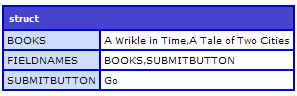
But if you check the third book, which has a title containing commas, things start to get messy:

Continue reading ‘Accessing ColdFusion form values as an array’ »
Posted by Ryan Stille on March 22 2011 at 7:44 am under ColdFusion.
Comments Off on Accessing ColdFusion form values as an array.
At work we had an issue where we had too many FCKeditor rich text controls on a page at once. We probably had 6 or 7, each on their own tab. For the tabs we are using the <cflayout type="tab"> tag. FireFox would handle the page with no problems, but IE would sometimes fail to load one or more of the rich text controls and would not throw any kind of error about it. The controls simply did not display.
A solution we came up with was to load the rich text controls on demand, when the user needed to use them, rather than load them all when the page first loads. At first I thought we’d have to install a separate, stand alone copy of FCKeditor (now called “CKEditor”) to do this, but we found out this is unnecessary, you use the version that comes with CF to do this.
First, we manually load the FCKeditor JavaScript:
<script type="text/javascript" src="/CFIDE/scripts/ajax/FCKeditor/fckeditor.js"></script>
Then create a function that can change a regular textarea into a rich text controls:
<script type="text/javascript">
function changeToRichText(elementToHide,id,width,height) {
	var oFCKeditor = new FCKeditor(id,width,height,'my_toolbar_set') ;
	oFCKeditor.BasePath = "/CFIDE/scripts/ajax/FCKeditor/";
	oFCKeditor.ReplaceTextarea();
	if (elementToHide) elementToHide.style.display = 'none';
	}
</script>
Then we changed the places on the page that used to have rich text controls to instead use plain textareas. Then placed an link next to each one the user can click on to change the textarea into a rich text. Sometimes they don’t need the functionality of rich text and will just enter plain text into a textarea. Here is the code:
<div id="rootCause_outter" style="text-align: left; width: 100%;">click to use editor<br /></div>
<textarea name="rootCause" style="width:740px; height: 290px;"></textarea><br />
This is used for creating records only, not editing. But it would not be hard to modify this to make it work on an edit page also.
Posted by Ryan Stille on March 6 2011 at 4:20 pm under AJAX / JavaScript, ColdFusion.
Comments Off on Loading CFrichtext / FCKeditor on-the-fly.
I have been involved in setting up a new Mura site on Windows 2008 Server. Mura is a full featured CMS written in ColdFusion.
By default Mura URLs look something like /index.cfm/SiteID/pagename. So for example the contact us page might look like /index.cfm/default/contact-us. Not a great URL. But its fairly simple to translate into /contact-us which is much nicer.
Getting rid of the SiteID
Getting rid of the siteID is easy in the newest version of Mura. In the config/settings.ini.cfm file there is a setting named “siteidinurls”. Set this to 0 and Mura will no longer add the siteID to the URLs it generates. Of course this only works if you plan on only using Mura for one site. If you had more than one site, Mura wouldn’t know which one you are trying to access. There are several ways to get around this if you have more than one site, but I won’t get into that in this article.
Getting rid of the index.cfm
Getting rid of the index.cfm takes a little more work. There is another setting in the ini file called indexfileinurls. Setting this to 0 will remove the index.cfm from the URLs Mura generates. But when you click on any of those links you are going to get the 404 page. To fix this, you’ll need to tweak your webserver.
Apache is pretty straight forward, as you would expect. Enable the mod_rewrite module and drop this into an .htaccess file in your webroot:
RewriteEngine On
RewriteCond %{DOCUMENT_ROOT}%{REQUEST_URI} !-d
RewriteRule ^([a-zA-Z0-9/-]+)$ /index.cfm%{REQUEST_URI} [PT]
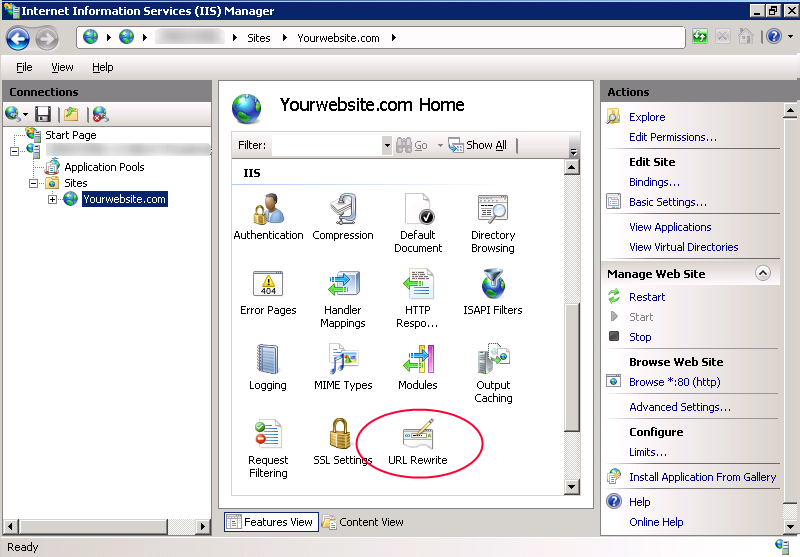
Our site happens to be hosted on Windows 2008 Server / IIS7. To do the rewriting on II7 you’ll need to install Microsoft’s URL rewriting extension. You can get it from here: http://www.iis.net/download/URLRewrite
Once its installed, open IIS Manager. Click on your website, then double click on the new URL rewrite icon.
Continue reading ‘Mura URL rewriting on Windows 2008 / IIS7’ »
Posted by Ryan Stille on December 9 2010 at 5:21 pm under ColdFusion, System Administration.
13 Comments.
Here’s a neat trick when you need to concatenate child rows in a SQL Select statement. What do I mean by that? Its a little hard to explain, so I’ll try to illustrate below.
Say you have these two database tables:
orders
| OrderID |
OrderNotes |
| 1 |
Notes about order 1 |
| 2 |
Notes about order 2 |
| 3 |
Notes about order 3 |
orderLines
| LineItemID |
OrderID |
LineNotes |
| 50 |
1 |
ABC |
| 51 |
1 |
XYZ |
| 52 |
2 |
HJK |
| 53 |
2 |
DEF |
| 54 |
2 |
KLM |
Using the SQL trick below you will end up with a result set that looks like this:
| OrderID |
OrderNotes |
listOfLineNotes |
| 1 |
Notes about order 1 |
ABC,XYZ |
| 2 |
Notes about order 2 |
HJK,DEF,KLM |
| 3 |
Notes about order 3 |
NULL |
When would you need to do this? I’ve need it a couple times. One was when we were grabbing database records to index into Verity. We wanted not only data from the orders table, but also wanted to index all the notes on each line item, which were separate records in a different table. We didn’t want to index these separately, because if there was a match in a Verity search we wanted to return the order, not the line item. Using the query below we were able to combine all this data into one query.
SELECT *
FROM orders AS o
CROSS APPLY (
	SELECT linenotes + ','
	FROM orderLines AS ol
	WHERE ol.orderID = o.orderID
	FOR XML PATH('') )
temp ( listOfLineNotes )
Using this code, listOfLineNotes will be a comma separated list of all the line item notes for this order.
Another time this trick came in handy was when we needed to get some records from a literature database table to display on our public website. We were going to do some filtering using JavaScript, so needed a field in each literature item row that contained a list of all the categories the item was in. This was an easy way to accomplish that.
Posted by Ryan Stille on October 20 2010 at 10:39 am under SQL.
8 Comments.
 In a meeting the other day we decided to bring in some of our customers and have them take a look at a new website we are building for them. I immediately thought of this book so I got it and read in a weekend. Rocket Surgery Made Easy by Steve Krug is “The Do-it-Yourself Guide to Finding and Fixing Usability Problems”. I love one of Steve’s other books, Don’t Make Me Think which is a great primer on building interfaces with good usability.
Rocket Surgery Made Easy is a short, easy read, just my kind of book. After reading this book I felt I was ready to sit down with a user and get feedback from them on our site. Steve is a veteran in doing usability testing and he imparts his wisdom in a easy to absorb way.
Three big take-aways from this book are:
– How to test any design, on a web page or hand drawn.
– How to find the most important problems
– And how to fix the problems you’ve found, using his “The least you can do” approach.
If you don’t have any experience in usability testing, but find yourself needing to do so, this is the book for you.
Posted by Ryan Stille on October 8 2010 at 7:14 pm under Book Reviews.
1 Comment.
I ran into an issue today where users were unable to lookup a certain part in our system. The part in question had a µ character in the product code (don’t get me started!). I started adding some debug outputs and found that when the part number was passed to our back end system, the µ had been replaced with an ‘M’!
After some more troubleshooting I figured out the culprit was ucase(). We run all part numbers through ucase() before passing them in. At first I thought this was a CF bug, after verifying that the java string.toUpperCase() method did exactly the same thing I had to look into it some more.
It turns out that M actually is the uppercase version of µ, sort of. The µ character, which is ascii code 181, is often used to abbreviate ‘micro’ as in microamp (µA) or microfarad (µF). Its the 12th letter of the greek alphabet, ‘Mu‘. The lowercase version is μ, the uppercase version is M.
I tested this on Railo and got exactly the same result, which makes sense because I think both engines just call the .toUpperCase() method in the JVM.
So while this is technically correct, I’m certain is almost never what the developer actually wants to do. I have not found a good way around this issue, except to maybe look specifically for this character, replace it out, do the ucase(), then put the character back. For now I was able to remove the ucase() calls because they were not absolutely necessary. Any other ideas?
Update: This is what I came up with as a work around. I thought it would be slow but benchmarking it shows its 0ms even with a 50 character string.
<cffunction name="safeUcase" returntype="string" hint="Uppercases only letters">
	<cfargument name="inputString" />
	<cfset local.outputString = "" >
	<cfloop from="1" to="#Len(arguments.inputString)#" index="local.i">
		<cfset local.chr = Mid(arguments.inputString,local.i,1) />
		<cfset local.asciiCode = Asc(local.chr) />
		<cfif local.asciiCode LTE 122 AND local.asciiCode GTE 97>
			<cfset local.outputString &= ucase(local.chr) />
		<cfelse>
			<cfset local.outputString &= local.chr />
		</cfif>
	</cfloop>

	<cfreturn local.outputString />
</cffunction>
Posted by Ryan Stille on September 7 2010 at 7:53 pm under ColdFusion, Railo.
Comments Off on Be careful using ucase() on odd characters.
The built in CF debugging information displayed at the bottom of every page is very useful. But there are times where it doesn’t work very well. For example, any time you are using a framework, or where you are passing content around to CFC methods. Any data passed to a CFC method will be shown in the standard debugging information. This can cause havoc if the content contains some JavaScript. I use the datatables jQuery plugin on my site, so I have some JavaScript calls that turn a regular HTML table into a “datatable”. But when debugging info is on, this JavaScript code can get run several times, since the browser doesn’t know to ignore the JavaScript listed in the debugging information. This causes problems.
So I have an interest in getting rid of some of the info, but I do want some of it, mainly the queries. Its actually very easy to customize the ColdFusion debugging information. In the ColdFusion administrator, under the Debugging Output Settings menu there is a drop down to select the debugging format.
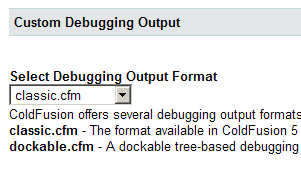
The files listed here are the contents of the C:\ColdFusion9\wwwroot\WEB-INF\debug directory. To create a custom debugging output all you need to do is drop a new file in this directory. Start with an existing one and customize it to your needs.
Here is one I’ve created that only shows database queries: Download queriesOnly.cfm
Posted by Ryan Stille on August 8 2010 at 8:21 pm under ColdFusion.
Comments Off on Make CF Debugging output show queries only.
Did you know there is an IsDebugMode() function in ColdFusion? I just discovered this. This will be great for showing additional data when you are debugging your app. For example, you could leave this code in your order view page all the time:
<cfif IsDebugMode()>
    By the way here is the complete order:
    <cfdump var="#orderBean.toStruct()#">
</cfif>
IsDebugMode() will return true whenever you have debugging enabled in the Administrator and you are coming from one of the allowed debugging IP addresses. This works in Railo and OpenBD, too.
Posted by Ryan Stille on July 27 2010 at 8:38 am under ColdFusion.
4 Comments.