Archive for the ‘ColdFusion’ Category

Today a coworker asked me if I knew how to recover a deleted file in CFEclipse. He had accidentally deleted it before putting into his source control. Since he had been working on this file recently, there is a way to recover it.

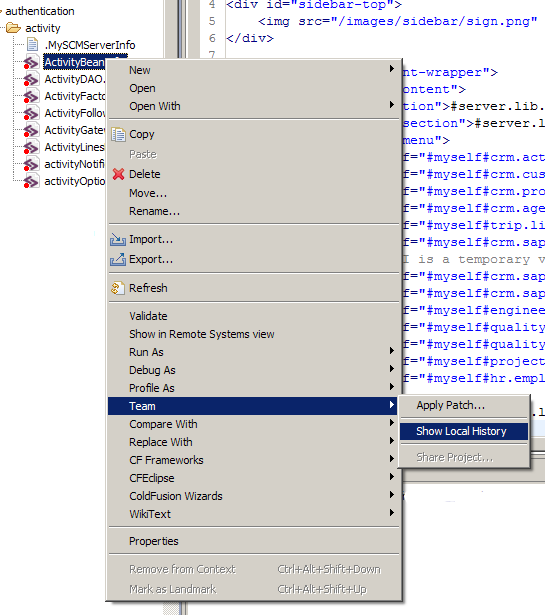
By default Eclipse keeps a local history of the files you work on. From within Eclipse, right click on a file and select Team->Show Local History.

eclipise file history

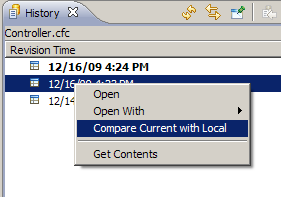
From here you will get a list of revisions, generally one is made each time you save the file. You can open a revision, or even use a built in diff tool to compare it to your current version.

eclipse history file list

But in this case we had no current version to even right click on to start the process. So we simply created a new, empty file in the same location as the old one. Then we were able to right click on it and pull up the history.

This local history is stored under your workspace in workspace\.metadata\.plugins\org.eclipse.core.resources\.history, but its not easy to manually browse. There any many directories and the files in those directories are given nonsense file names. Much easier to stick with the Eclipse interface.

Keep in mind that if you haven’t edited the file in a while there may not be any history to go to.

The other day I had the need to align some data in an html cfgrid. There are some alignment attributes of the cfgriditem tag, but they do not work in html grids. I tried wrapping the data in a span tag with some css aligning it, but that didn’t work either.

But there is a way. When CF8 generates the grid it writes out CSS ids and classes that you can use to style the grid. For example to right align the 5th column you can use this:

.x-grid-td-5 {text-align:right;}

The number you need to use in the class name does not always match up with the column. Sometimes I had to use .x-grid-td-8 to reference the 6th column for example. I think the number increments for each cfgrid item, even if you have display=no.

If you have more than one cfgrid on your page and only want to align the nth column in one of them, you can wrap the cfgird in a div with an ID so you can reference only that grid in your CSS.

I just discovered a neat feature of CF9. Sometimes when calling a built in function or even a custom method, you get returned an array. But sometimes you only need one element in that array. In Perl and other languages its possible to directly access the element you want. I’m glad to see this has been added to ColdFusion9.

For example, lets say you need the second particular element in an XML document. You might fetch some XML with cffeed and then use XMLSearch() to get all the matching elements. Then reference the second element of the resulting array, like this:
Continue reading ‘Referencing returned value array values in CF9’ »

If you’ve used the new CF8 UI features to create tabs, you may have run into an issue when you have a lot of them. By default the tabs will not wrap. Take this snippet of code for example. I’ve added a red border on this 300 pixel div so you can see the tabs won’t wrap inside of it:

<div style="font-family: arial; width: 300px; border: 1px solid red;">
<cflayout type="tab" name="myTabs">
  <cflayoutarea name="january" title="January 2009">
     <p>January</p>
  </cflayoutarea>
  <cflayoutarea name="february" title="February 2009">
     <p>February</p>
  </cflayoutarea>
  <cflayoutarea name="march" title="March 2009">
     <p>March</p>
  </cflayoutarea>
  <cflayoutarea name="april" title="April 2009">
     <p>April</p>
  </cflayoutarea>
</cflayout>
</div>

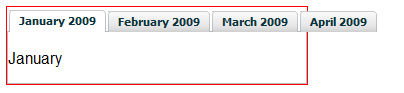
Imagine that 300 pixel div is your normal content area – it could be a table or just the width of your browser. Take a look at what it produces in your browser:
cflayout tabs not wrapping example

In ColdFusion 8 (this might change in CF9?) the tabs generated by cflayout are table data cells. It would be pretty hard to cause table data cells to wrap within a set of <tr></tr> tags wouldn’t you think? It actually is possible though. If you add this snippet of CSS:

<style type="text/css">
.x-tabs-strip tr {display:block}
.x-tabs-strip td {display:block; float:left}
.x-tabs-strip .on .x-tabs-inner {padding-bottom:4px}
</style>

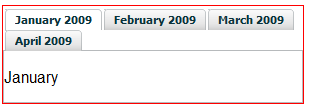
You’ll see the tabs now look like this:
example of tabs wrapping

If you want to force the tabs to be a specific width, add one more line:
<style type="text/css">
.x-tabs-strip tr {display:block}
.x-tabs-strip td {display:block; float:left}
.x-tabs-strip .on .x-tabs-inner {padding-bottom:4px}
.x-tabs-wrap table {width:400px}
</style>

In most JavaScript frameworks tabs are done using list elements (<li> tags) inside an unordered list (<ul> tag). This approach is much more flexible. It will be interesting to see what changes are made to the html generated by the layout tags in ColdFusion9.

Update 1/4/2010 – The method described above does NOT work in CF9. The tabs generated in CF9 are done using a much newer version of EXT. They are no longer based on table data cells, instead they use list items ( <li> tags), like most tab implementations. Use this CSS to wrap the tabs in CF9.

One of the new features I am excited to see in ColdFusion 9 is support for anonymous arrays. I’ve used these before in PHP, Perl, and other languages, and I’m glad to see them added to ColdFusion.

I blogged about this issue in 2007. I was trying to add a column to an existing array that I knew only had one row. QueryAddColumn() accepts an array of values to add to an existing query – one element for each row. So I only needed an array with one element. So I thought I could use CF8′s new inline array syntax and just pass it in like this:

<cfset QueryAddColumn(existingQuery,
                     "newColName",
                     "varchar",
                     ["single new value"])>

This would throw an error in CF8, but works just fine in CF9!

By the way this also works just fine in the current version of Railo.

Did you know there is a “format” attribute for the cfdump tag? The default format is html, but you can also pass in a format of “text”. I’ve found this useful for putting data structures into plain text emails, logs files, and other things.

For example, this code:

<cfset tmp.fname = "John">
<cfset tmp.lname = "Smith">
<cfset tmp.age   = 26>
<cfset tmp.city  = "Omaha">
<cfset tmp.state = "Nebraska">
<cfdump var="#tmp#" format="text">

Produces this output:

struct
AGE: 26
CITY: Omaha
FNAME: John
LNAME: Smith
STATE: Nebraska

It works for complex structures, too:

<cfset tmp.person1.fname = "John">
<cfset tmp.person1.lname = "Smith">
<cfset tmp.person1.age   = 26>
<cfset tmp.person1.city  = "Omaha">
<cfset tmp.person1.state = "Nebraska">
<cfset tmp.person1.pets  = ['Fluffy','Mr. Jingles','Bambi']>

<cfset tmp.person2.fname = "Mary">
<cfset tmp.person2.lname = "Doogan">
<cfset tmp.person2.age   = 32>
<cfset tmp.person2.city  = "Kansas City">
<cfset tmp.person2.state = "Missouri">
<cfset tmp.person2.pets  = []>
<cfdump var="#tmp#" format="text">

Produces this output:

Struct
PERSON2 Struct
	AGE number 32
	LNAME string Doogan
	PETS Array
	STATE string Missouri
	CITY string Kansas City
	FNAME string Mary 

PERSON1 Struct
	AGE number 26
	LNAME string Smith
	PETS Array
		1 string Fluffy
		2 string Mr. Jingles
		3 string Bambi
	STATE string Nebraska
	CITY string Omaha
	FNAME string John

Railo also supports the “format” attribute, but BlueDragon does not. In fact Railo supports a bunch of interesting attributes to the cfdump tag.

There have been some attacks recently against ColdFusion servers that allow users to upload files. This is a common feature on many sites – uploading your profile photo, classified ad pictures, etc. Here is my take on handling file uploads securely.

First, make sure you are not uploading files directly into your webroot. For example if you store your user’s profile photos in /images/profilePhotos, don’t upload your file right into there. You need to put it somewhere safe first and verify that it really is an image file. Adding accept=”image/jpeg” to your cffile tag doesn’t save you here either. There are attacks where the mime type is spoofed, making ColdFusion think an image file is being uploaded, when really its a .cfm file.

So, you need to place the file somewhere outside your webroot. A convenient place to use is your server’s temp directory. You can get the path to a temp directory by calling the built-in getTempDirectory() function. For example:
Continue reading ‘Secure image uploading with ColdFusion’ »

If you are developing a ColdFusion application, or even just a stand alone CFC that you plan to distribute, you might want to make sure it runs on all three major CFML engines – Adobe ColdFusion, Railo, and Open BlueDragon. It can be tedious to always copy code around between your three test sites, but there is an easier way. You can have the same code base run through all three CFML engines at once.

There are a few caveats: Continue reading ‘Running your CFML code through Railo, OpenBD, and Adobe CF all at once’ »

I have been working on an project in my spare time that will eventually be deployed on Open BlueDragon. I ran into an error the other night after adding some methods to one my CFCs. I run all three CFML engines side by side (another blog post about that is coming soon), so I was easily able to see and compare the error messages in all three.

This was my error message in OpenBD:
error-openbd
Continue reading ‘Error messages on Railo, OpenBD and ColdFusion 8 compared’ »

We had an issue recently where one of our Excel import routines was putting garbled data into the database. By “garbled” I mean the field contained a few normal words then broke into a bunch of strange characters. This Excel file was read in using an ODBC datasource.

If you are not familiar with this method of reading Excel files, here is a short summary.
1) Create a system ODBC DSN using the MS Excel driver in your Windows ODBC control panel. Point it to an empty .xls file somewhere on your drive.
2) Create a datasource in ColdFusion (driver: “ODBC Socket”) and select your Windows ODBC DSN from the drop down.
3) Copy the XLS file you want to read on top of the empty file you setup in your ODBC DSN.
4) Use it like this in your CFML:

<cfquery name="myQuery" datasource="XLSPassThroughDSN">
SELECT *
FROM [Sheet1$]
</cfquery>

This usually works well but for some reason we were having problems. Digging through the Excel file turned up nothing out of the ordinary, except some rows (and not the ones causing problems) looked like they were double byte encoded (unicode).

Turns out this XLS driver determines the data type of each column in the spread sheet by looking through the first couple of rows and guessing a data type based on that data. In our case column B only contained values with less than 100 characters in the first few dozen rows. So the driver assumed it was a varchar type of some length. But much further down in the spread sheet, in a different row, that same column contained a value that was several hundred characters, thus overflowing the data type.

Normally this only results in truncated data. If that would have been the issue I probably would have found the fix much sooner. But instead we were ending up with garbled data, which was truncated as well but it was impossible to tell.

The fix is to adjust your registry to tell the driver to scan through more, preferably all, of the rows before guessing at a data type. In your odbc control panel you’ll notice a setting for this:
ODBC DSN screen shot

But, that doesn’t work! You need to change the registry value manually. I set mine to 1000, since that will cover the length of any of the spreadsheets we upload.

The registry keys are located at:

For Excel 97:
HKEY_LOCAL_MACHINE\SOFTWARE\Microsoft\Jet\3.5\Engines\Excel
For Excel 2000 and later versions:
HKEY_LOCAL_MACHINE\SOFTWARE\Microsoft\Jet\4.0\Engines\Excel

Here is the MS knowledge base article for more detail: http://support.microsoft.com/kb/189897/

Now the driver scans through all the rows before determining a data type, and probably uses something like a “text” type for column B. I think our data may have been getting garbled, instead of just truncated, because of the double byte data.