Archive for the ‘ColdFusion’ Category

Today I needed to get the size of a file I’m working with. If the file was being uploaded from an html form, I can get the file size after calling <cffile action="upload"></cffile> by looking to the cffile.fileSize variable. But in this case, my file was uploaded long ago.

It is possible to get the file size by using <cfdirectory action="list" directory="parentDir"></cfdirectory>. This will return a query containing entries for each file in the directory. One of the columns in the query will be the file size. You can narrow it down to returning only your file by specifying a filter.

<cfdirectory action="list" directory="parentDir" filter="myfile.txt"></cfdirectory>

I don’t know if this filter is applied before or after the directory contents are read in. Anyway I didn’t really like this approach, maybe I’m just spoiled by Ruby’s simplicity ( File.size(“myfile.txt”) ), but this seems like the round about way to get a file’s size.

There is a more elegant way to do it with Java, and its very simple. If we create a Java “file” object, we can call the length() method on that object to get the size of the file in bytes. You can do it in one line.
Continue reading ‘Getting the size of a file in ColdFusion’ »

I was recently working with some java libraries that looked to a system property for a configuration setting. The sample Java app that came with the library was setting the system property on the command line. Their windows .bat file and Linux shell script both launched the java app like this:

java.exe -cp .;package1.jar -Dcom.company.product.maxvalue=500 SampleApp

Note the -D option, that sets the java system property com.company.product.maxvalue to 500. If you are not familiar with java system properties – they are kind of like a global variable, accessible via any java code.

I didn’t want to have to edit my Jrun start up options and add the -D option on there. That option is not even possible for many ColdFusion users. But setting a system property via ColdFusion is actually very easy.
Continue reading ‘You *can* set Java system properties via ColdFusion’ »

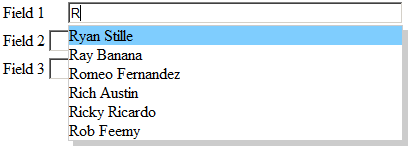
I was creating a form the other day that had 3 form fields, layed out vertically on top of one another. I switched the first field to be a cfinput, so I could use the autosuggest feature:

cfinput example 1
Continue reading ‘ColdFusion 8 auto-suggest shows through other form fields’ »

I was trying to use QueryAddColumn() today to add an additional column to a single-row array I’m working with. The 4th parameter to QueryAddColumn is an array of values to add to the query – 1 element in the array for each row in the query. Since my query only has on row in it, I thought this would be a good place to use ColdFusion 8′s new inline array syntax.

<cfset QueryAddColumn(qryFoo,
                     "newColName",
                     "varchar",
                     ["my additional value"])>

But this throws an unhelpful “Missing argument name” error:

Missing argument name. When using named parameters to a function, every parameter must have a name.

It took me a while to figure out it just didn’t like using the new array syntax inside the function. Doing it this way worked fine:

<cfset myArray = ["my additional value"]>
<cfset QueryAddColumn(qryFoo,"newColName","varchar",myArray)>

But having to do it that way kind of defeats the point, it doesn’t use any less lines than the old CF7 syntax:

<cfset myArray[0] = "my additional value">
<cfset QueryAddColumn(qryFoo,"newColName","varchar",myArray)>

And it means I have to “var” the myArray variable at the top of my function now. Hopefully Adobe will get this straightened out at some point.

One of the projects I’ve been working on recently requires the ability to receive faxes and place them into a customer’s account. At first we looked at using optical character recognition to scan out the customer’s ID from the cover sheet, but this route was looking expensive and time consuming, and we weren’t sure we would be able to reliably read the customer IDs, since faxes are sometimes hard to read even with the human eye. We are providing a pre-filled out cover sheet, so the customer ID would be printed, not hand written, but I think it would still be difficult to read.

Just around this time I saw Jim Rising‘s post on cf-talk saying that if you need to do this kind of thing, you really should be looking at using a 2D barcode instead of trying to OCR a number. So I did. He mentioned Java4Less, a company that sells reasonably priced (~$100) java libraries for reading and writing barcodes, including data matrix barcodes. A datamatrix barcode is a 2D barcode that can encode more data in less space than a traditional barcode. Its also much more durable, and can be read even when faxed several times. They look like this:

datamatrix barcode example

Continue reading ‘CFC for generating and reading 2D barcodes in ColdFusion’ »

I encountered a problem (or should I say an “opportunity”) where I needed to do some rounding in a query-of-a-query. This is normally very easy to do in most RDBMS, as there is usually some type of Round() function you can use. In my case I needed to round a percentage I was calculating in the Q of a Q down to only 1 decimal place. And I didn’t even really need to round it – I would be ok with simply truncating. Turns out this is a little difficult to do in a query of a query. There are no round() functions, no ceiling() or floor(), and no string manipulation functions. Here is what I came up with:
Continue reading ‘Rounding values in a Query of a Query’ »

A few weeks ago I had to interface to Authorize.net’s recurring billing API. This is a new API they released early this year. Prior to this, if you wanted a recurring billing subscription setup, you had to log into their site and set it up manually.

When I went to begin coding I searched high and low for an existing custom tag or cfc, but did not find any. So now that mine is complete, I’ve posted it on RiaForge.

ColdFusion CFC for Authorize.net recurring billing API

There is a README file in the zip archive that has fairly detailed instructions, but here are the basics:
Continue reading ‘Authorize.net recurring billing API CFC’ »

Or – Resolving the ColdFusion Content is not allowed in prolog Error.

If you’ve tried to consume web services with ColdFusion, you may have run into this issue when attempting to use the returned XML. I’ve seen this crop up when simply pulling in an RSS feed as well. Often there are some strange characters at the beginning of the XML response. We can see the problem if we use Firefox to browse to the Authorize.net web service:

Firefox BOM error
Continue reading ‘Cleaning up those funny characters on an XML web service result’ »

When building an application that uses an Application.cfc file, many times the OnApplicationStart() method is used to initialize Application scope variables.

Since this method is only called once until the next server restart, its safe to set your Application variables here without using cflock tags. A common implementation may look like this:

<cffunction name="onApplicationStart" returntype="boolean">
	<cfset Application.dsn = "myDSN">
	</cfset><cfset Application.smtpserver = "localhost">
</cfset></cffunction>

But what happens when you need to change one of those variables? For example if you change the Application.smtpserver value to “newhost.com”, and save the file, Application.smtpserver will still be set to localhost. Restarting the ColdFusion server will force the OnApplicationStart() method to be called again, thus loading in your new value, but that is a little drastic.
Continue reading ‘Providing feedback when forcing a refresh of the Application scope’ »

Tonight I gave an “Intro to ColdFusion” presentation at the Omaha Dynamic Language Users Group. As promised, here are the links from my Resources slides. The full presentation is also available: Open Office (1194Kb), PDF (560Kb)